
bx_1c_sync.php install it on your computer and upload it to the root folder of the site.Configuring the script
Before launching, at the beginning of the downloaded file in the line$password = ''; You need to specify a password that you can use to log in.
You need to work with the script in browser mode. incognito so that it doesn't turn out that we are working from the admin and everything is fine, but 1C then it works from another user and everything breaks down.
To emulate the unloading of goods from 1C to the website, you must first make an exchange by setting file saving. This is done by adding a line to /bitrix/php_interface/dbconn.php, which enables saving files in a folder upload/1c_catalog:
define("BX_CATALOG_IMPORT_1C_PRESERVE", true);
Running the script
Initially, you will have a window like this:
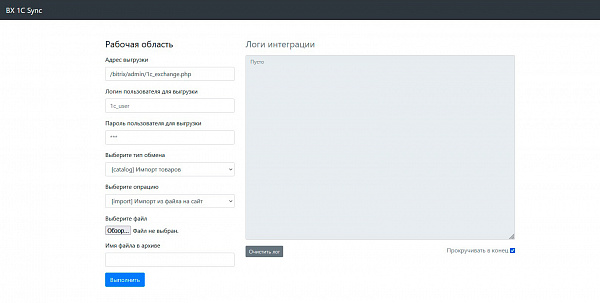
If the integration has not been redone on the site, then you will have a standard upload address.
/bitrix/admin/1c_exchange.php
Login and password are the ones that 1C uses to access the site.
Type of exchange and operation - select the desired ones from the list.
If required, select the file. Most often, the site works with archives. When uploading the archive, specify the name of the xml file in the archive.
When using the get_catalog method, the site returns the products one at a time. If you have 1000 products, you will need at least 1000 requests. Therefore, the script does not try to download all the goods, but receives only the first 5.
Work plan to fix the upload bug
- Find out from 1C what address they are uploading to
- To add logging of all incoming requests to this file, for example::
file_put_contents(__FILE__ . '.log', date('r') . '->' . $_SERVER['REQUEST_URI'] . PHP_EOL, FILE_APPEND); - Setting the constant
BX_CATALOG_IMPORT_1C_PRESERVEintrue - Performing a full upload
- Let's see if what needs to change has changed.
- Looking at the files in
/upload/1c_catalog - Using the script at the link above, we upload ourselves to the same address where 1C uploads
- Let's see if what needs to change has changed.
- We compare the requests from 1C and from the script, they should be the same
- Manually run the script and debug it, look at where it is working out what condition is wrong and determine how to fix it.
Stages of exchange
The exchange is always encodedwindows-1251. There are six types of requests in the exchange, and we'll talk about them later.
By default, the entry point is a file /bitrix/admin/1c_exchange.php, all requests are sent there:
https://example.ru/bitrix/admin/1c_exchange.php?type=catalog&mode=checkauth
The first request is always checkauth, through HTTP basic authentication the login and password are transmitted, the response is similar to this:
success
PHPSESSID
c84bba7587de83c2b7f88a837ffc4237
sessid=641ec5e7f1547d4934458141ec237512
timestamp=1623238486
If successful, the first line is success. The second line cookie's name, the third cookie value. Next are the parameters that should be passed in all subsequent requests.
The files are transmitted in the request body, the files on the server are not taken from $_FILES, and from php://input. That is, the data is not divided as in the usual POST request via boundary, and all the data being sent is a file.
Sale type - import and export of online store orders
checkauthauthorization check, no action is taking placeinitdeletes files from the exchange folder1c_exchange, checks the file.htaccess, sets the mode if requiredzipqueryunloading orders by filter, unloads orders that were updated after the last uploadsuccessafterquery, sets the end time of the last uploadfileuploading a file if oninitit waszip=yes, the file must be in the formatzip. For older versions of the exchange, there is also a validation check.xmlimportUnpacking the archive is only available in the new version. File processing without creating temporary tablesinfogetting online store directories on the website
CRM type - for working with 1C and Bitrix 24
The same as sale, not in use zip, compression via is possible gz, you can receive specific orders for ID, you can specify the date starting from which to upload orders
Catalog type - import of goods to the website
checkauthauthorization verification, no action is taking place, the parameter is present in the responsetimestampinitinitializing the exchange, deletes files from the exchange folder1c_catalog, checks the file.htaccess, sets if a mode is requiredzipfileuploading a file, if at the stageinitit waszip=yes, the file must be in the formatzip- import - data import in several steps:
1. If usedzipunpacking
2. Deleting old temporary tables
3. Creating temporary tables, an event is triggeredOnBeforeCatalogImport1C
4. ReadingXMLand transferring data to temporary tables
5. Creating indexes in temporary tables
6. Importing metadata
7. Importing partitions
8. Deactivating old partitions
9. Import of goods
10. Deactivation of old products
12. Deleting the info block cache, ending work, calling an eventOnSuccessCatalogImport1C deactivatedeactivation of old sections and products on the site that are older thantimestamp. It is transmitted from 1C to the sitetimestamp, which was obtained in the methodcheckauthcompletethe event of successful completion of the exchange, the launch of the eventOnCompleteCatalogImport1C
It is through the binding to the event OnSuccessCatalogImport1C many people refine the import, since at this step you can access the file and get any field from there. The callback accepts two parameters: "Connection parameters of the exchange component" of the array type and "Full path to the XML file of the exchange" of the string type.
The reference type is uploading reference books (hlblocks) to the site
checkauthauthorization check, no action is taking placeinitdeletes files from the exchange folder1c_highloadblock, checks the file.htaccess, sets if a mode is requiredzipfileuploading a file, if at the stageinitit waszip=yes, the file must be in the formatzipimportdata import, an event is triggered at the beginning of data processingOnBeforeCatalogImportHL, at the endOnSuccessCatalogImportHL
get_catalog type - export of goods from the site
initauthorization check, no action is taking placequerygetting the file
The listen type is waiting for changes.
Request to wait for changes in orders. The server response is pending 1 Just a minute If there have been changes, reply success, an exchange of orders is required. If there were no changes, the answer is no, HTTP 304 Not Modified. Next, 1C sends the request again with the expectation of changes.